


What is robots.txt?
A robots.txt file tells search engines which parts of your site to crawl and which to skip. It uses both “allow” and “disallow” instructions to guide crawlers toward the pages you want crawled.
You don’t have to have one: in the HTTP Archive’s 2025 Web Almanac, about 85% of sites returned a robots.txt file (HTTP 200) and about 13% returned a 404, meaning no file at all. Crawlers default to unrestricted crawling when the file is missing, so the file matters most when you have specific areas you want bots to skip.
On this page, we’ll answer all your burning questions about robots.txt files, including:
- What is Robots.txt?
- Robots.txt File Anatomy
- Where Did Robots.txt Come From?
- Robots.txt Example
- Why is Robots.txt Important?
- How to Create a Robots.txt File
- Common Issues with Robots.txt Files
- When Should You Update a Robots.txt File?
- 6 Tips to Do Robots.txt for SEO Successfully
Robots.txt file anatomy
Learn more about robots.txt with this anatomy breakdown:
| Component | Purpose | Example |
| User agent | Defines who the rule applies to, like all or specific crawlers | User-agent: Googlebot |
| Disallow | Defines which folders the user agent should not crawl | Disallow: /confidential/ |
| Allow | Defines which folders the user agent should crawl within disallowed folders | Allow: /confidential/public-report.pdf |
| Comments | Defines what the rules are for viewers | # Blocks Googlebot from crawling /confidential/ except for public-report.pdf |
| Sitemap | Defines where the XML sitemap lives | Sitemap: https://example.com/sitemap.xml |
Where did robots.txt come from?
Back in 1994, the robots.txt file was known as the RobotsNotWanted.txt (named in response to a web crawler overloading a server), with the shared goal of giving webmasters the ability to tell crawlers what not to crawl.
The name (RobotsNotWanted.txt) didn’t stick.
The protocol was renamed robots.txt in the same year and got adopted by search engines of the day, like AltaVista. More than two decades later, Google proposed making robots.txt an official internet standard in 2019, and the Internet Engineering Task Force (IETF) published it as RFC 9309 in September 2022.
IETF focuses on standardizing robots.txt’s:
- Naming, like calling the file “robots.txt”
- Implementation, like placing the file on the root folder
- Encoding, like using UTF-8
- Structure, like having groups and rules
While Google proposed the standard, it does not own the protocol. IETF is a non-profit organization (and a child of another non-profit, the Internet Society) separate from Google and its parent company, Alphabet.
Robots.txt example
So, what does a robots.txt file look like? Each robots.txt file looks different depending upon what you do and don’t allow Google to crawl.
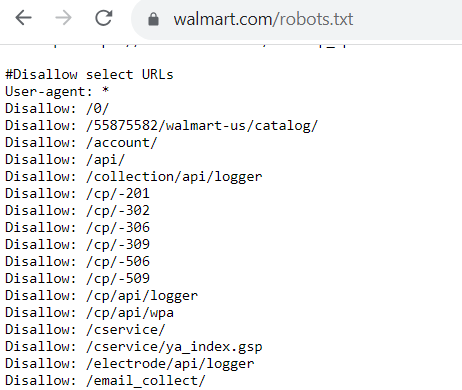
If there are pages you do allow bots to crawl, the code will look like this:
User-agent: Googlebot
Allow: /
The user-agent is the bot you allow (or don’t allow) to crawl your website. In this robots.txt example, you’re allowing Googlebot to crawl pages on your website.
Now, if you don’t want a bot to crawl pages on your website, the code looks like this:
User-agent: Bingbot
Disallow: /
For this robots.txt example, this code indicates that the Bingbot cannot crawl pages on a website.
Why is robots.txt important?
So, why does robots.txt matter? Why do you need to worry about integrating this file into your website?
Here are some reasons robots.txt is crucial for your search engine optimization (SEO) strategy:
1. It keeps your website from getting overloaded
One of the biggest reasons to implement a robots.txt file is to prevent your website from getting overloaded with crawl requests.
With the robots.txt file in place, you help manage the crawl traffic on your website so that it doesn’t overwhelm and slow down your website.
Google will send crawl requests to crawl and index pages on your website — it can send dozens of requests at once. With the robots.txt file in place, you help manage the crawl traffic on your website so that it doesn’t overwhelm and slow down your website.
A slow website has negative consequences for SEO, since Google wants to deliver fast-loading websites in search results. So, by implementing the robots.txt file, you ensure that Google doesn’t overload and slow down your website while crawling it.
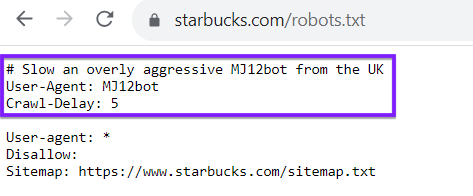
Keep in mind, your robots.txt file isn’t exclusive to search engine crawlers like Google or Bing. You can also use your robots.txt file to direct crawlers from others websites. As an example, look at the robots.txt file for Starbucks, which delays a certain bot:
2. It helps you optimize your crawl budget
Every website has a crawl budget, which is the number of pages Google crawls within a specific amount of time. If you have more pages on your website than you can allow within your crawl budget, it leads to pages not getting indexed, which means they can’t rank.
While your robots.txt file can’t keep pages from getting indexed, it can direct crawlers on where to spend their time.
Using robots.txt helps you optimize your crawl budget. It helps guide Google bots towards the pages you want crawled. While your robots.txt file can’t keep pages from getting indexed, it can keep the crawl bots focused on the pages that need to be crawled most.
3. It helps keep crawlers away from low-value pages
Every site has pages that don’t need to be crawled, like login pages, internal search results, and duplicate URLs. Robots.txt can tell crawlers to skip them, which saves crawl activity for the pages that matter.
Robots.txt controls crawling, not indexing. A blocked URL can still appear in search results, without a description, if other sites link to it. To keep a page out of Google, use noindex or password protection.
How to create a robots.txt file
Follow these steps to create your robots.txt file:
- Create a new file in a text editor like Notepad (Windows) or TextEdit (Mac)
- Define your rules, organized as groups and directives
- Explain your rules to other viewers, like teammates, with comments
- Add your XML sitemap location at the end of your file
- Save your file as robots.txt
- Upload your robots.txt file to your site’s root folder
- Check your robots.txt file in the robots.txt report in Google Search Console, which shows whether Google found and fetched your file and flags any parsing issues
Common issues with robots.txt files
Sometimes, websites experience issues when using robots.txt. One potential problem is that the file blocks Google (or other search engines) from crawling your website at all. If you find that something like that is happening, you’ll want to update your robots.txt file to fix that.
Another potential issue is that sensitive or private data lives somewhere on your site. Robots.txt isn’t a security tool: the file is publicly readable, and not every crawler obeys it. Protect private files with a password or other access controls, not a Disallow rule.
When should you update a robots.txt file?
Even after you create a robots.txt file, you’ll likely need to update it at some point. But when might you need to do that, exactly?
Here are a few times when you might update your robots.txt file:
- When you migrate to a new content management system (CMS)
- When you want to improve how Google crawls your site
- When you add a new section or subdomain to your site
- When you change to a new website altogether
All of these changes require you to go in and edit your robots.txt file to reflect what’s happening on your site.
6 tips to do robots.txt for SEO successfully
Ready to implement a robots.txt file into your website? Here are 6 tips to help you do it successfully:
- Make Sure All Your Important Pages Are Crawlable
- List each user-agent once
- Use New Lines for Each Directive
- Make Sure You Use Proper Capitalization
- Use the “*” Symbol to Give Direction
- Use the “$” to Simplify Coding
1. Make sure all your important pages are crawlable
Before creating your robots.txt file, it’s important to identify the most important pages on your website. You want to ensure those pages get crawled, so they can rank in search results.
Before creating your robots.txt file, document the important pages you want to allow search bots to crawl. These might include pages like your:
- Product pages
- About us page
- Informational pages
- Blog posts
- Contact page
2. List each user-agent once
It’s a good habit to list each user-agent only once when you create your robots.txt file. Crawlers that follow RFC 9309 merge duplicate groups for the same user agent, so repeating one won’t break your rules. A single group is still easier to read, especially if there are quite a few pages you want to disallow.
Here’s a robots.txt example showing the difference:
User-agent: Googlebot
Disallow: /pageurl/
User-agent: Googlebot
Disallow: /loginpage/
Now, imagine you needed to do this for multiple URLs. It would get repetitive and make your robots.txt file difficult to follow. Instead, it’s best to organize it like this:
User-agent: Googlebot
Disallow: /pageurl/
Disallow: /loginpage/
With this setup, all of the disallowed links are organized under the specific user-agent. This makes it easier to find lines you need to adjust, add, or remove for specific bots.
3. Use new lines for each directive
When you create your robots.txt file, it’s crucial that you put each directive on its own line. Again, this tip will make it easier for you to manage your file.
So, anytime you add a user agent, it should be on its own line with the bot name. The next line should have the disallow or allow information. Every subsequent disallow line should be on its own.
Here’s a robots.txt example of what not to do:
User-agent: Googlebot Disallow: /pageurl/ Disallow: /loginpage/
As you can see, it makes it more challenging to read your robots.txt and know what it says.
If you make a mistake, for example, it’ll be difficult to find the right line to fix.
Putting each directive on its own line will make it easier to make changes later.
4. Make sure you use proper capitalization
Capitalization matters in robots.txt, but not everywhere. Under RFC 9309, the file name must be all lowercase, URL paths in your rules should be matched case-sensitively, and user-agent names like Googlebot are matched case-insensitively. A rule with the wrong capitalization in a path may not match the URL you meant to block.
5. Use the “*” symbol to give direction
If you have numerous URLs under the same address that you want to block bots from crawling, you can use the “*” symbol, called the wildcard, to block all those URLs at once.
For example, let’s say you want to disallow all pages that pertain to internal searches. Instead of blocking each page individually, you can simplify your file.
Instead of it looking like this:
User-agent: *
Disallow: /search/hoodies/
Disallow: /search/red-hoodies/
Disallow: /search/sweaters
You can use the “*” symbol to simplify it:
User-agent: *
Disallow: /search/*
By implementing this step, search engine bots are blocked from crawling any URLs under the “search” subfolder. Using the wildcard symbol is an easy way for you to disallow pages in batches.
6. Use the “$” to simplify coding
There are numerous coding tricks you can use to make it easier to create your robots.txt file. One trick is to use the “$” symbol to indicate the end of a URL.
If you have similar pages you want to disallow, you can save yourself time by using the “$” to apply it to all similar URLs.
For example, let’s say you want to keep Google from crawling your videos. Here’s how that code might look if you do each one:
User-agent: Googlebot
Disallow: /products.3gp
Disallow: /sweaters.3gp
Disallow: /hoodies.3gp
Instead of having all of them on separate lines, you can use the “$” to disallow all of them. It looks like this:
User-agent: GooglebotDisallow: /*.3gp$
Using this symbol indicates to crawlers that any pages ending with the “.3gp” cannot be crawled.
Broaden your SEO knowledge
Adding robots.txt to your website is crucial for helping Google crawl your pages without overloading it. It’s one of the aspects that will help you do SEO effectively.
Looking to enhance your site’s SEO? Our expert team can help you implement effective robots.txt strategies and optimize your website for better indexing. Contact us online today to learn how we can support your SEO initiatives!

SEO Services That Aren’t Cookie Cutter
Get an SEO strategy that’s tailored for your business, industry, and revenue goals.


SEO Services That Aren’t Cookie Cutter
Get an SEO strategy that’s tailored for your business, industry, and revenue goals.
Writers